

Download AdiumBook – free contact sync tool for Adium and macOS Address Book
Overview
If you spend a lot of time chatting on Adium and keep your personal contacts in the macOS Address Book, the manual effort of keeping both lists in sync can become a real headache. That’s where AdiumBook steps in. This lightweight, single‑windowed application is purpose‑built to bridge the gap between your instant‑messaging roster and your native contact database.
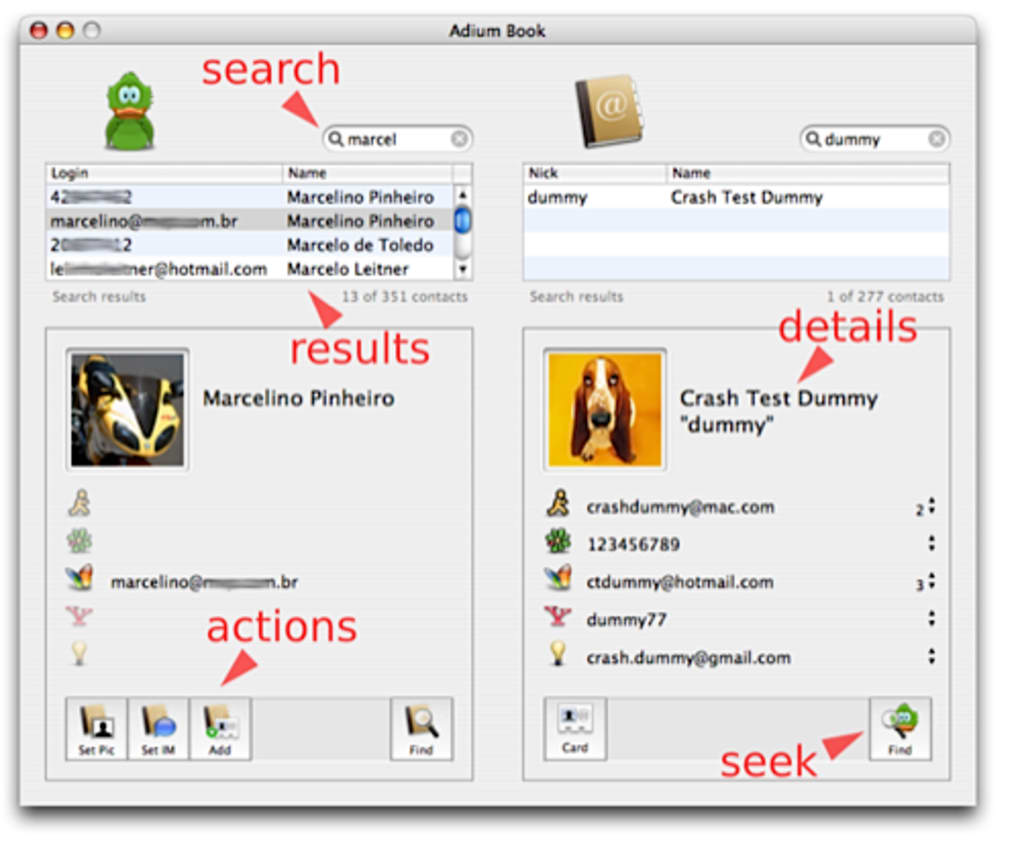
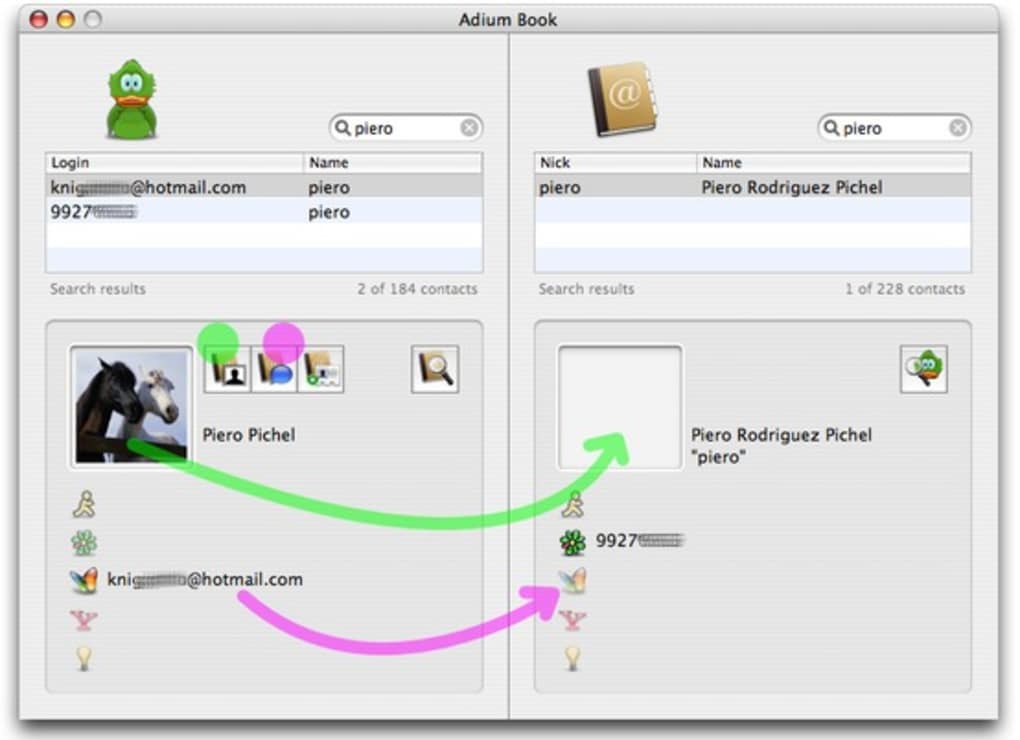
The interface is intentionally minimalistic: on the left you see every Adium buddy, on the right the corresponding Address Book entries. With a simple drag‑and‑drop action you can move contacts between the two lists, add missing entries, or delete duplicates. A pair of search boxes at the top of each pane let you locate a contact instantly, while built‑in reporting tools highlight mismatches, missing avatars, or contacts that belong to a specific IM service.
Although AdiumBook does not boast a deep preferences panel or advanced automation scripts, its core mission—reliable, visual syncing—gets done quickly and securely. Because the program is free, runs locally, and does not require an internet connection, it fits perfectly into privacy‑conscious workflows. Once your address book and Adium buddy list are aligned, you’ll likely never need to launch the app again, which is a testament to its efficiency.
In the sections that follow we’ll dive into the standout features, walk through installation, discuss system compatibility, and weigh the pros and cons so you can decide whether AdiumBook is the right addition to your macOS toolkit.
Key Features that Make AdiumBook Stand Out
- Dual‑pane visual sync: Simultaneously view Adium contacts and Address Book entries side‑by‑side.
- Drag‑and‑drop syncing: Move contacts between lists with a single mouse gesture; no need for manual entry.
- Instant search boxes: Each pane includes a responsive search field that filters contacts as you type.
- Report generation: Create quick reports that list contacts missing from either side, entries without photos, or groups sorted by IM service.
- Free and offline: The app runs completely offline, ensuring your contact data never leaves your Mac.
- Simple UI: A single window with no hidden menus means you can start syncing within seconds of launching.
- Compatibility with macOS Address Book (Contacts): Works with the native Contacts database used by macOS Ventura, Monterey, and earlier releases.
While the feature set may appear modest compared with full‑blown contact management suites, each capability is finely tuned for the specific task of aligning Adium’s buddy list with the system address book. The drag‑and‑drop mechanic eliminates the tedious copy‑and‑paste routine that many users endure, and the reports give you a clear overview of any lingering discrepancies. Because the application is built on native macOS frameworks, performance is snappy even when you have thousands of contacts. The lack of a preferences pane might feel limiting to power users, but it also means there are fewer settings to misconfigure, resulting in a more stable experience. Overall, AdiumBook delivers a focused, no‑frills solution that does exactly what its name promises—sync your Adium contacts with your Address Book—without the bloat of unnecessary features.
Installation & Usage Instructions
Step‑by‑Step Installation
1. Download the installer: Visit the official AdiumBook download page and click the “Download for macOS” button. The file is a small .dmg package (approximately 4 MB).
2.
Open the DMG: Double‑click the downloaded file to mount the disk image. A window will appear showing the AdiumBook app icon.
3. Drag to Applications: Drag the AdiumBook icon into your /Applications folder. macOS may ask for your administrator password to confirm the move.
4.
Launch the app: Open the Applications folder and double‑click AdiumBook. The first launch may trigger a security warning; choose “Open” to allow the app to run.
5. Grant permissions: Because AdiumBook needs to read both your Adium preferences and the Contacts database, macOS will prompt you to grant access.
Click “OK” for both “Contacts” and “Files and Folders” permissions.
Basic Workflow for Syncing Contacts
Once the program starts, you’ll see two columns. The left column lists every buddy stored in Adium’s ~/Library/Application Support/Adium/Users/Default/Accounts folder. The right column reflects the entries in your macOS Contacts app.
To sync a contact, simply click on a buddy on the left, drag it to the right pane, and release. A dialog will appear asking whether you want to create a new contact or merge with an existing one. Choose the appropriate option, and the contact details (nickname, IM handle, and avatar) are copied into your Address Book.
Conversely, you can drag a contact from the right pane into the left to add it to Adium. Use the search boxes at the top of each pane to locate specific names quickly—type “john” and both lists will filter in real time. When you’re satisfied with the sync, click the “Generate Report” button at the bottom.
The report will open in a new window, highlighting any contacts that still lack a counterpart, entries without photos, or duplicate buddies. You can export this report as a plain‑text file for future reference. Finally, close the app; all changes are saved instantly, and you can return to your regular chatting or contact‑management workflow.
Compatibility, Pros & Cons
AdiumBook is designed exclusively for macOS. It runs natively on macOS 10.12 (Sierra) and later, including the current Ventura and Monterey releases. Because it relies on the built‑in Contacts framework, you’ll get full compatibility with the native address book database, regardless of whether you store contacts locally or via iCloud. The application does not have Windows, Linux, Android, or iOS versions, so it’s strictly a macOS‑only utility.
Pros
- Free to download and use—no hidden fees or subscription required.
- Simple, single‑window UI that gets you syncing in seconds.
- Drag‑and‑drop functionality eliminates manual data entry.
- Instant search filters speed up locating contacts.
- Report generation helps you audit mismatched or incomplete entries.
- Runs entirely offline, preserving privacy.
Cons
- No advanced preferences or automation scripts for power users.
- Lacks support for non‑macOS platforms (Windows, Linux, Android, iOS).
- Cannot sync groups or custom contact fields beyond basic IM info.
- Interface may feel too minimalist for users who prefer feature‑rich contact managers.
- Once contacts are synced, the app becomes largely redundant, offering limited ongoing value.
Overall, AdiumBook earns a solid four‑star rating for delivering exactly what it promises: a quick, free, and secure way to align Adium buddies with the macOS Address Book. Its simplicity is both a strength and a limitation, making it ideal for casual users while leaving power users wanting more customization.
Frequently Asked Questions (FAQ)
Is AdiumBook compatible with the latest macOS Ventura?
Yes. AdiumBook runs on macOS 10.12 and later, which includes Ventura, Monterey, and earlier releases. The app uses the native Contacts framework, so it works seamlessly with the updated system address book.
Do I need an internet connection to sync contacts?
No. All syncing happens locally on your Mac. The only time you might need the internet is to download the installer or to sync your Contacts app with iCloud, which is independent of AdiumBook.
Can AdiumBook import contacts from other messaging apps?
AdiumBook is specifically built for Adium’s buddy list. It does not support direct import from other IM clients such as iChat, Skype, or third‑party services.
Is there a way to automate the sync process?
The current version does not include automation or scheduling features. Syncing is performed manually via the drag‑and‑drop interface, which is intentional to keep the app lightweight and secure.
What happens to my contacts after I close the app?
All changes are saved instantly to the macOS Contacts database and Adium’s configuration files. Closing the app does not revert any modifications; you can reopen it later to verify or adjust the sync.
Conclusion & Call to Action
In a world where instant‑messaging and address‑book management often exist in silos, AdiumBook offers a refreshingly straightforward bridge. Its free price tag, offline operation, and intuitive drag‑and‑drop interface make it an attractive utility for anyone who relies on Adium for daily chats and wants their contacts consolidated in the macOS Address Book. While power users may miss advanced preferences or cross‑platform support, the core experience—quickly visualizing and syncing two contact lists—delivers tangible time savings and reduces the risk of duplicate or missing entries. If you’re looking for a secure, hassle‑free way to keep your IM buddies aligned with your native contacts, download AdiumBook today and enjoy a cleaner, more organized communication workflow.
Click here to download AdiumBook for free and start syncing your contacts in minutes.







